C Strings
Strings are Arrays of Characters
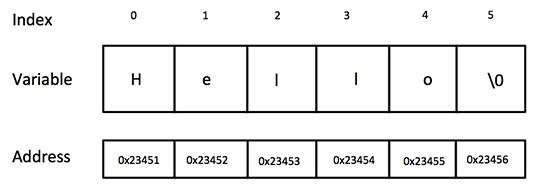
Strings in C are represented by a one dimensional array of characters that are terminated by a null character \0.
char greet[6] = {'H','e','l','l','o','\0'};
char greet[] = "Hello"; // null character \0 added automatically


char greet[6];
greet = "Hello"; // Will not work - the `strcpy()` function must be used instead.
Strings, like all arrays, are stored in consecutive spaces in memory.
String Functions
From the #include<string.h> library.
| Function | What it does |
|---|---|
| strcpy(s1,s2); | Copies s2 in to s1 |
| strcat(s1,s2); | Concatenates s2 on to s1 |
| strlen(s1); | Returns length of s1 |
| strcmp(s1,s2); | Compares s1 & s2, 0 if same |
| strchr(s1,ch); | Returns a pointer to the first ch in s1 |
| strstr(s1,s2); | Returns a pointer to the first occurrence of s2 in s1 |
scanf() to read a string
#include <stdio.h>
int main()
{
    char name[20];
    printf("Enter name: ");
    scanf("%s", name);
    printf("Your name is %s.", name);
    return 0;
}
Enter name: Dennis Ritchie
Your name is Dennis.
Even though Dennis Ritchie was entered in the above program, only “Dennis” was stored in the name string. It’s because there was a space after Dennis.
fgets() to read a line og text
#include <stdio.h>
int main()
{
    char name[30];
    printf("Enter name: ");
    fgets(name, sizeof(name), stdin);  // read string
    printf("Name: ");
    puts(name);    // display string
    return 0;
}
Enter name: Tom Hanks
Name: Tom Hanks
Here, we have used fgets() function to read a string from the user.
fgets(name, sizeof(name), stdlin); // read string
The sizeof(name) results to 30. Hence, we can take a maximum of 30 characters as input which is the size of the name string. We specify the length of the target string to prevent buffer overflow. The function gets() has been removed from the C standard as it allows any length of string to be read in and can easily cause buffer overflows.